
Building My Own Todoist with Claude and Codex
A task manager I can change to fit my own life.
I built this side project because I wanted a task manager I could customize exactly the way I wanted.
Todoist was my starting point. My projects, tasks, and completion history were already there, and I liked the familiar workflow: capture something quickly, find it in Today, and put it into the right project. I wanted to keep that rhythm and have control over how the app worked.
That meant being able to change the interface, add features, and define my own rules for personal and family tasks. Who can see a project? Who can complete an assigned chore? How should recurring tasks behave? With my own code, I could make those decisions and revise them as my needs changed.
Claude and Codex made building it practical. I called it KenDo.
The first attempt, built with Sol 6, was ugly and buggy. Then I switched to Opus 5.5. With very little additional prompting, it produced what I would describe as a 1:1 recreation of the Todoist interface I wanted.
KenDo is now live, with the core task workflow and family collaboration in place. My Todoist data has been migrated and verified. I now have a familiar task manager whose features and rules I can change myself.
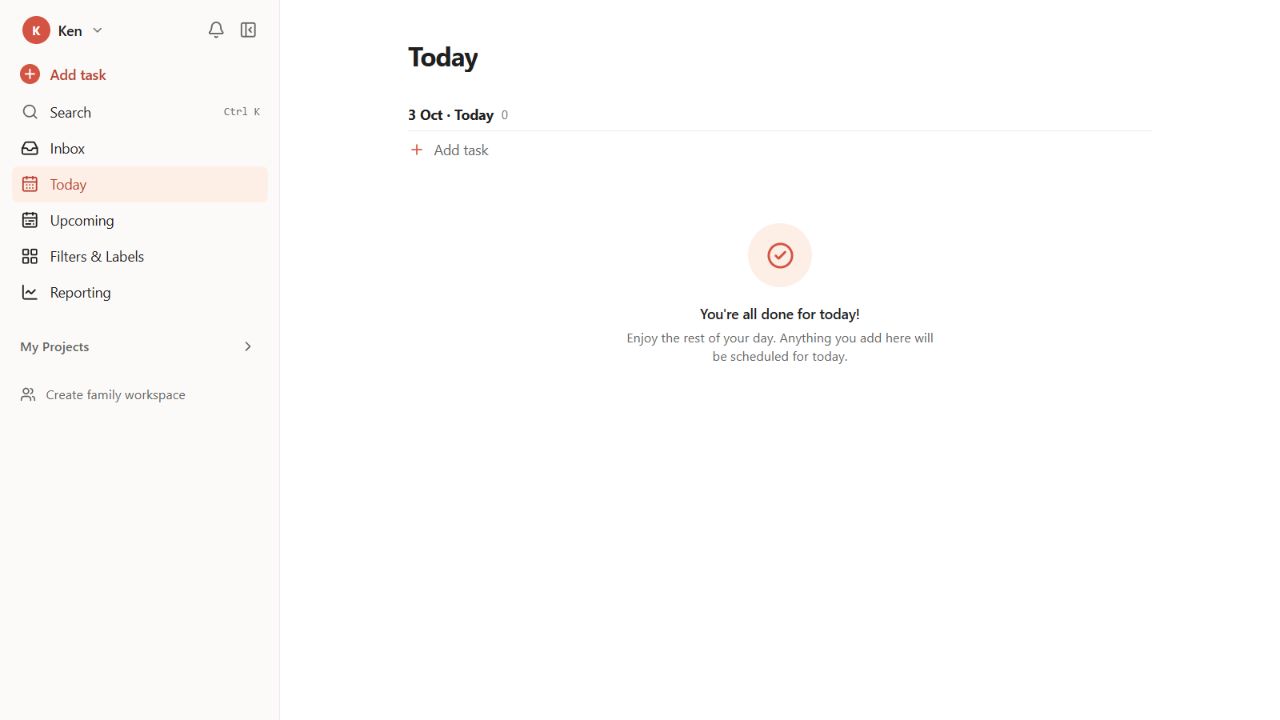
The current Today view. Project names are collapsed in this screenshot.
A familiar workflow with room for family life
Todoist gave me a reference for task capture, projects, sections, and the Today view. Family workspaces needed some additional rules: who owns a shared task, whether a child can complete an assigned chore without editing the project, and whether the workspace owner can see private projects.
I put these decisions into a detailed product requirements document before implementation. It covered the task model, roles, views, security, and delivery phases. Codex had an implementation brief, and I could check the result against it.
Shopping lists, a family dashboard, reminders, and collaboration are all in the spec. Some are implemented; others remain in the backlog.
From Sol 6 to Opus 5.5
The Sol 6 version had the broad shape of a task app. The UI was ugly and the app was buggy. Here is its Upcoming view:

Before: the Sol 6 version, from my original screenshot.
Opus 5.5 recreated the Todoist look and feel with little extra prompting. I did not need a long sequence of instructions for each part of the interface.
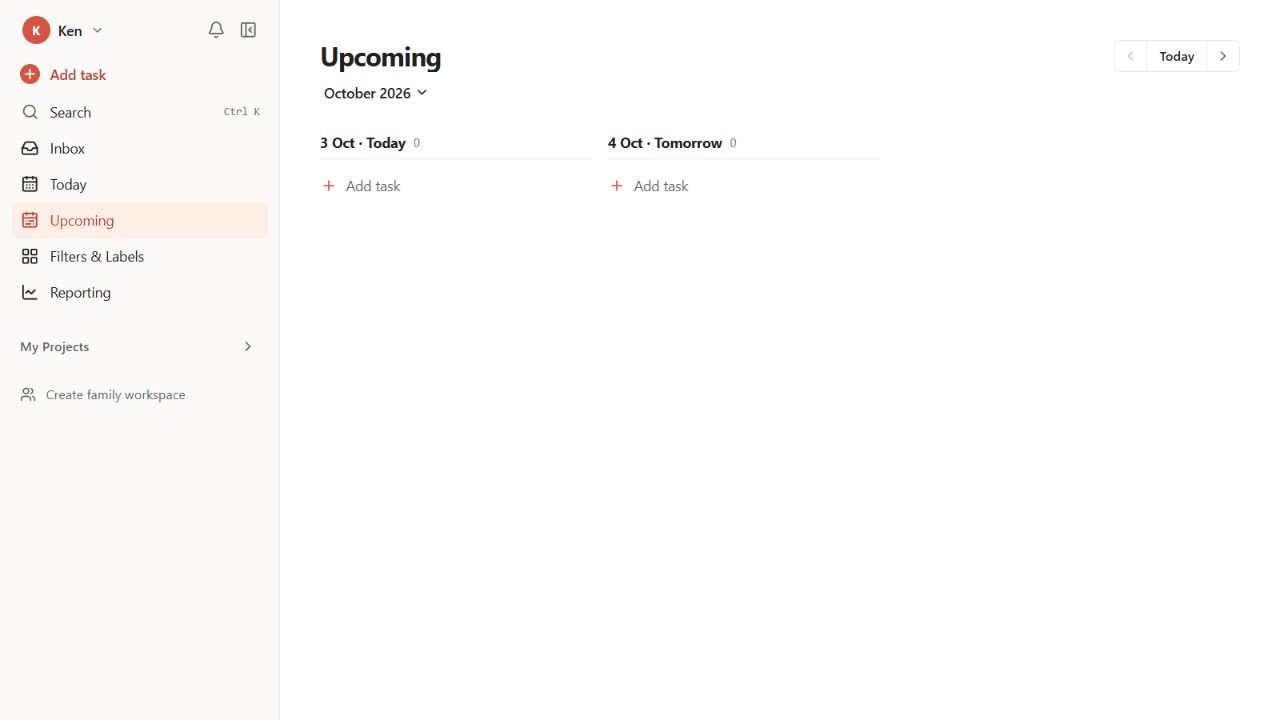
After: the current Upcoming view. The screenshots use different dates and viewport sizes.
The repository already had a detailed PRD, so the rebuild had that context. What impressed me was how little additional direction it needed.
I still needed to check behavior, permissions, and edge cases. KenDo also has its own family features and unfinished backlog.
Keeping two assistants on the same project
I used Claude and Codex across the build, and Codex for the migration. Repository files kept the work connected between sessions.
CLAUDE.md records conventions. The architecture notes explain design decisions. CHECKPOINT.md records what is live, which checks passed, and what remains. The migration has a separate progress log. Each session can read these files rather than rely on a decision buried in an earlier chat.
In September I added the early task views, weekly calendar, reporting, projects, performance improvements, and an API. On 2 October I rebuilt the core around the Todoist-style workflow, then added hardening and project archiving. Family workspaces and collaboration landed on 3 October.
After the interface rebuild, recurrence, sync, error handling, accessibility, and archived-project rules still needed attention.
The small interactions that make it feel useful
Repeated actions are where I notice unnecessary clicks: capturing a task, finding it, moving it to tomorrow, and completing it. Quick Add accepts:
Buy milk tomorrow 6pm #Home @errands p1
KenDo parses the input into a title, schedule, project, label, and priority. Shared assignments use +Name, leaving @ for labels. It also supports keyboard shortcuts, a command palette, subtasks, and project list or board views.
Archiving puts a finished project away without deleting its contents. Archived projects disappear from everyday views, can be restored, and are read-only while archived. The rule also applies to writes from an old browser tab.
Application architecture
KenDo uses Next.js 16, React 19, TypeScript, and Tailwind CSS 4 on Vercel. Supabase provides authentication, PostgreSQL, and realtime events. TanStack Query manages the browser cache, Zod validates input, and Drizzle defines the typed database schema.
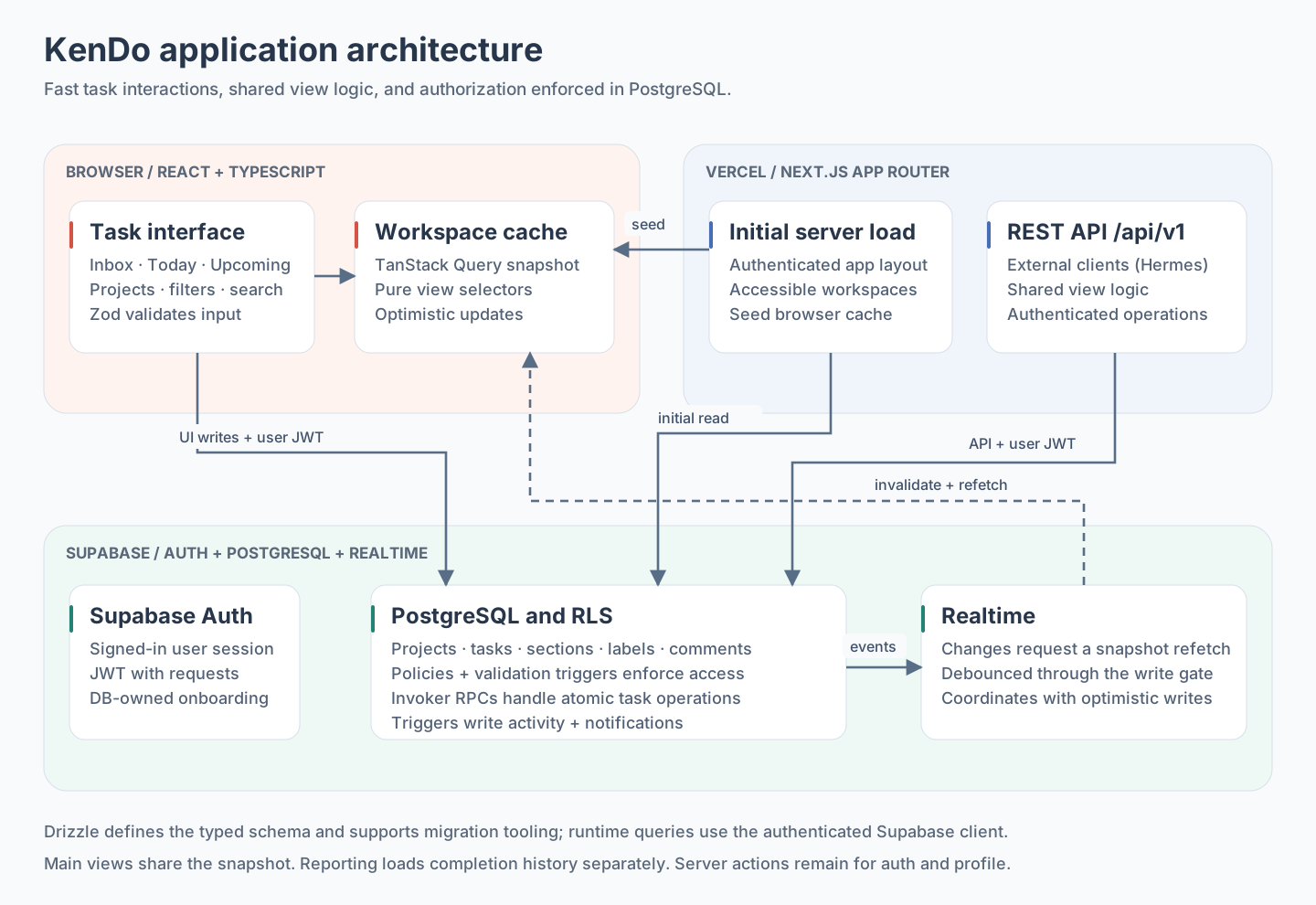
The browser updates the interface; PostgreSQL enforces permissions. Realtime events request a snapshot refresh.
Shared workspace snapshot
An earlier version fetched data separately for each page. The authenticated application layout now loads a workspace snapshot and seeds one TanStack Query cache entry.
Today, Upcoming, projects, filters, and search derive their results from this snapshot. It includes personal tasks and family projects the user can access. Reporting loads completion history separately.
Shared selectors keep the views consistent and can be tested independently. The REST API reuses this logic for external clients.
Optimistic writes and RLS
The browser validates input with Zod, updates the TanStack Query cache optimistically, and writes to Supabase using the signed-in user's session. If the write fails, it shows an error and refetches.
PostgreSQL Row Level Security (RLS) determines whether the write is allowed. The interface hides unavailable actions, and database policies enforce the restrictions.
Operations involving several rows, such as completing a parent task and its open descendants, use database functions that run with the caller's permissions. Drizzle supports schema and migration work; runtime queries use the authenticated Supabase client.
Realtime collaboration
When another family member changes data, Supabase realtime events request a debounced snapshot refresh. The write gate coordinates this refresh with pending optimistic writes.
Database triggers generate activity and in-app notifications so the web app and REST API behave consistently. Clients cannot insert their own activity entries.
The snapshot approach fits the current app. Larger workspaces may need a different loading strategy.
Dates and family permissions
“I plan to do this on Tuesday” and “this must be finished by Friday” mean different things. KenDo separates scheduled dates from deadlines. Timestamps are stored in UTC; Today and overdue calculations use calendar days in the user's profile timezone. Date-only deadlines stay dates.
Completing a recurring task records a completion event and advances its schedule to the next occurrence. The task remains available, and Reporting retains the history.
Children and guests see projects they have been added to. Children can complete assigned tasks without general editing rights. A private project stays private even from the family workspace owner.
The data model, policies, triggers, and UI all need to follow these rules.
Moving the tasks is a second project
The interface was familiar. Moving the data took more work.
I kept the migration in a separate workspace, with Todoist read-only and the existing KenDo data backed up. Task titles were only part of the job: dates, parent relationships, recurrence rules, comments, and completion history had to arrive with them.
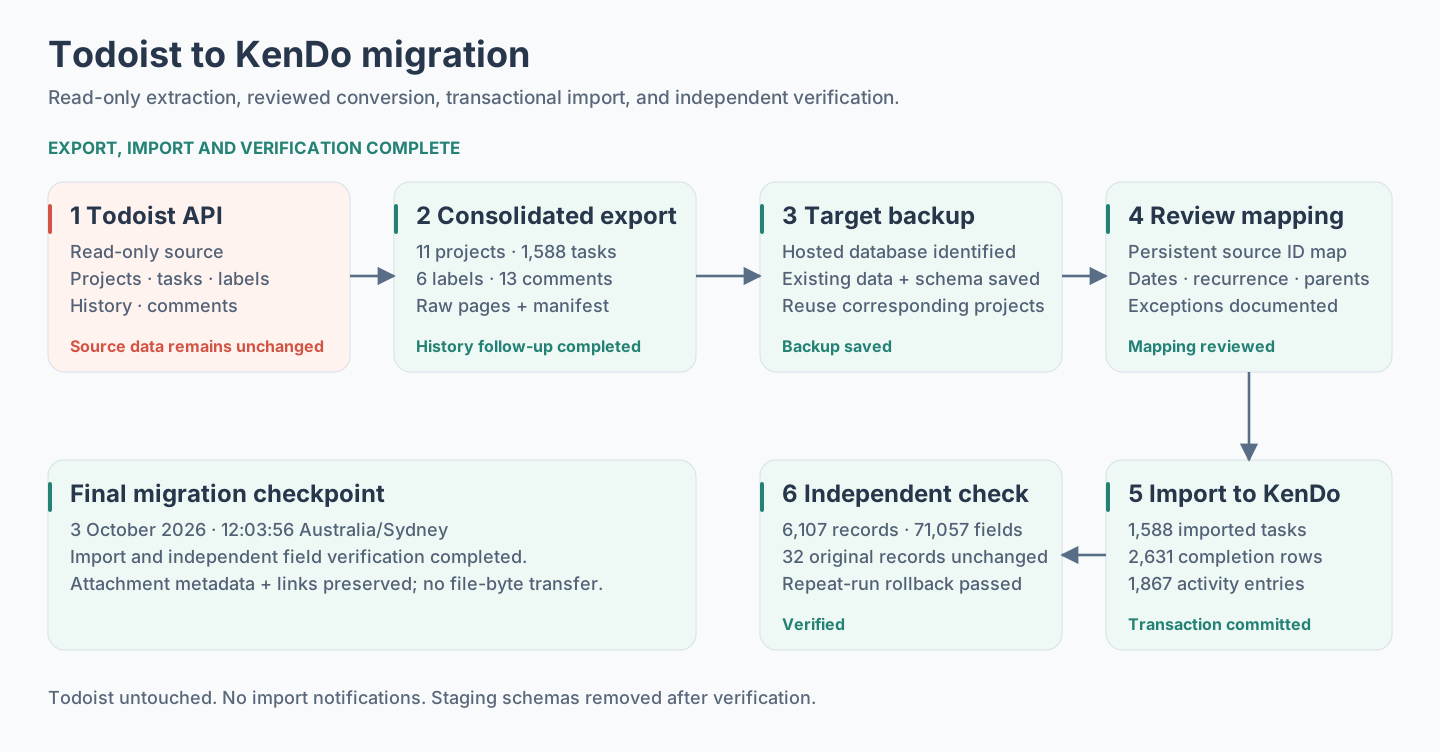
The migration was completed and independently verified on 3 October 2026. Attachment metadata and links were preserved; file bytes were not transferred.
The Python exporter follows pagination cursors, retries transient failures, and saves raw response pages with selected credential fields removed. Completed-history requests use 80-day windows. The app's local environment pointed at local Supabase, so the migration explicitly targeted the hosted database.
The first export was incomplete. Follow-up history reads recovered 578 older completed tasks. The consolidated source contained 230 open tasks and 1,358 completed tasks, along with six labels and 13 comments. Existing corresponding KenDo projects were reused, preserving their current names and settings.
An attempt to send roughly 3 MB of import SQL hit an HTTP 413 response before any application data was written. I changed the import to stage data in bounded batches inside a restricted schema, then perform the application writes and checks in one transaction.
Date conversion used KenDo's own date library and recurrence logic. The checks covered date-only tasks, timed tasks, Sydney daylight saving transitions, priorities, and subtask relationships. A full transaction dry run was rolled back before the committed import.
Completion history needed care. A completed task and an individual completion event are different records, especially for recurring tasks. The import preserved 2,550 actual completion events, reaching back to 27 January 2015, and added 81 completed-state records where event history was missing. That produced 2,631 completion-history rows, alongside 1,867 completion and uncompletion activity entries.
I kept the limits visible. Deleted or inaccessible tasks and their available history stayed in the local backup, as requested. Attachment metadata and available links were preserved, including one pending upload with no download URL. Two older completed tasks needed a write-order workaround that changed their update timestamps; the original timestamps remain in the backup. One historical label had no color metadata, so it received KenDo's default color.
The final independent check compared 6,107 imported records and 71,057 fields. All 32 pre-existing records were unchanged, including the reused projects and three Inbox test tasks. A repeat-run rollback check produced no duplicates. The import created no notifications, and the staging schemas were removed.
The imported task count is 1,588. KenDo's total is 1,591 because those three test tasks were kept. That distinction is small, but it is exactly the sort of thing I want a migration report to explain.
The migration session took 40m 43s, as recorded in the completion screen. The app itself was built over multiple sessions; this timer belongs to the migration.
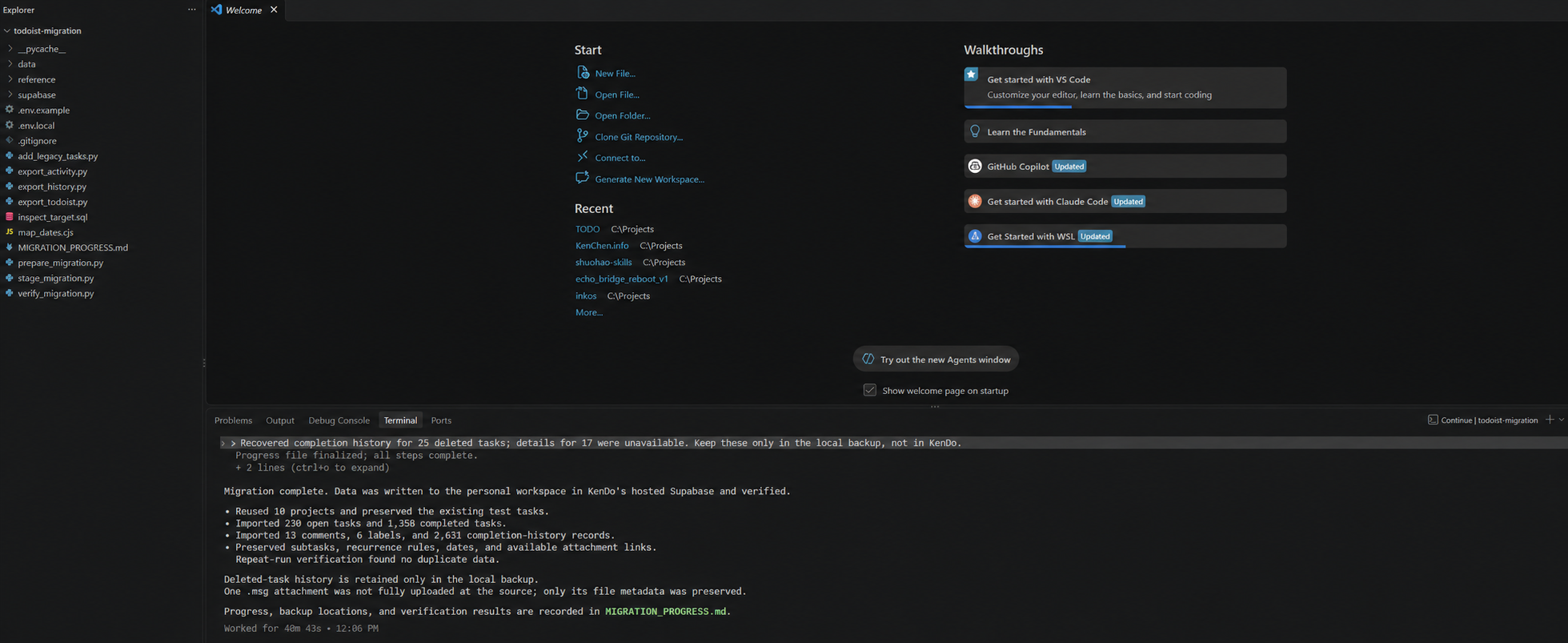
The migration completion screen, with its Chinese terminal output translated into English. Open the full-size screenshot.
Verification and remaining work
The 3 October checkpoint records 404 passing unit and integration tests, 81 passing pgTAP database tests, and 22 passing Playwright tests, including four realtime scenarios. The verification command also covers type checking, linting, and a production build.
Email delivery, push notifications, and scheduled reminders remain deferred. Invites use shared links and notifications are in-app. Shopping mode and the family dashboard are still ahead.
The migration is finished; the product still has a backlog. I now have the interface I wanted and my existing task data in KenDo, with the family dashboard and shopping workflow left to build.
Why I think apps like Todoist will fade
My prediction is that standalone task apps like Todoist will gradually fade out of the spotlight. As AI makes custom software easier to build and assistants take over more everyday interactions, I think the generic task-management app will lose much of its reason to be a separate product.
KenDo made that possibility concrete for me. I could recreate the workflow I knew and add rules for my own household. A standard task app has to make choices for a broad audience; a personal app can follow one person's choices. As building and changing these tools gets easier, I expect more people to choose software shaped around their needs. A polished list, board, or calendar will be harder to sell as the main reason to stay.
The way we interact with tasks is changing too. Todoist already offers Ramble for voice task capture and a Claude connector that can read, create, and update tasks and projects. I see these features as early signs of the shift. If an assistant can capture a task, find the right project, and help plan the week from a conversation, there are fewer reasons to open a dedicated task app. The data still needs a home, but the app may become a service working behind the scenes.
Moving that data could also become easier. My migration session took 40m 43s and preserved years of accessible task history, with backups, mapping, and verification. That is one experience, but it makes me expect less friction in moving between systems as these tools improve. A history built up over years may become a weaker reason to remain with a particular app.
The hard parts I found in KenDo also explain why I think this will be gradual. Recurrence, timezone handling, permissions, sync, and recovery all need maintenance. As testing, hosting, and maintenance tools improve, I expect more of that work to become manageable for smaller teams and individuals. Established task apps will face pressure to offer something people cannot easily assemble for themselves. Some may evolve into infrastructure for assistants; others may lose their place in people's daily routine.